AI Systems Explained: How to Build Intelligent Workflows Without Coding

AI systems are becoming more capable than the chatbots many professionals use for everyday productivity. Instead of simply generating an answer, an intelligent system can work with context, trusted knowledge, decision rules, workflows and feedback to help solve a real problem. Learners who want to develop these capabilities can explore the Artificial Intelligence Course from Digital Regenesys, which develops practical skills in building intelligent systems, machine learning, data and responsible AI.
This distinction was central to the Digital Regenesys masterclass Artificial Intelligence: Building Intelligent Systems. The session challenged participants to move beyond asking AI isolated questions and instead think like system designers: identify a real problem, determine what information the system needs, define the decisions it should support and decide where people must remain in control.
That shift changes the question from:
“What can this AI tool tell me?”
to:
“What intelligent system could I design to solve this problem?”
Watch the Digital Regenesys masterclass: Artificial Intelligence — Building Intelligent Systems.
https://www.facebook.com/watch/?v=2091663871447078
What Is an AI System?
An AI system is more than an artificial intelligence model producing an output.
It combines AI with information, processes, decision points and actions designed around a specific goal.
A simple way to think about an intelligent system is:
Problem → Input → Knowledge → AI → Decision → Action → Feedback
Each component plays a different role.
- Problem: What needs to be solved?
- Input: What information enters the system?
- Knowledge: What trusted information should the AI use?
- AI: What should the AI interpret, classify, summarise or generate?
- Decision: What conclusion or recommendation is required?
- Action: What should happen after the decision?
- Feedback: How can the system learn whether the outcome was useful?
This is why generating a response with an AI chatbot is not the same as building an intelligent system.
The intelligence comes partly from the model, but the usefulness of the solution depends heavily on how the overall system is designed.
Why Should You Start With the Problem, Not the AI Tool?
One of the most important lessons from building AI systems is that technology should not come first.
The problem should.
Before selecting an AI model, automation platform or agent, ask:
- What problem are we trying to solve?
- Who experiences this problem?
- What information is available?
- What decision needs to be made?
- What should happen after that decision?
- What risks could arise?
This prevents organisations from introducing AI simply because the technology is available.
A valuable system solves a genuine pain point.
For example, instead of deciding, “We need an AI chatbot,” a company might identify the real problem as:
Customers wait too long for straightforward refund and replacement queries to be assessed.
That problem statement provides a much clearer starting point for system design.
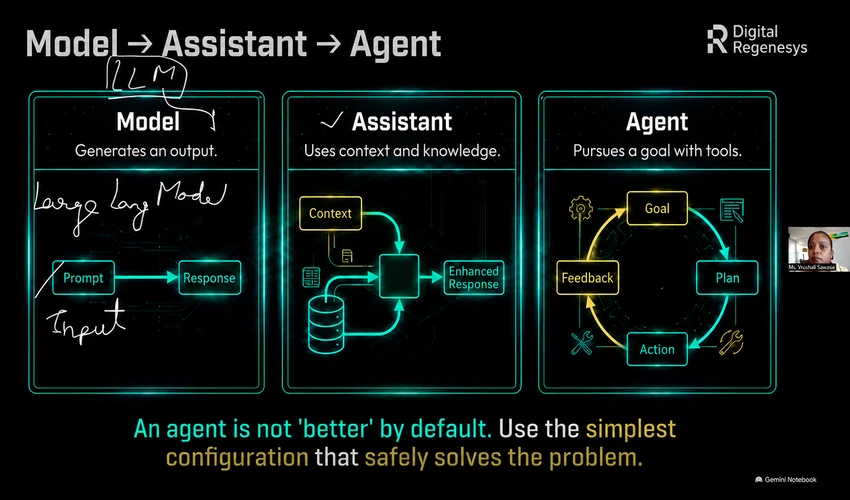
What Is the Difference Between an AI Model, Assistant and Agent?
The terms model, assistant and agent are often used interchangeably, but they represent different levels of AI capability.
AI Model
An AI model processes an input and produces an output.
A language model, for example, may receive a prompt and generate text in response.
The interaction may be relatively simple:
Prompt → Model → Response
AI Assistant
An AI assistant usually works with more context.
It may use instructions, previous information or a knowledge base to provide responses that are more specific to a task or user.
Examples can include:
- Customer support assistants
- Research assistants
- Travel assistants
- Workplace knowledge assistants
- Learning assistants
AI Agent
AI agents move another step further.
An agent can work towards a goal by evaluating information, planning steps and interacting with tools or workflows.
Instead of simply answering a question, an agent may help coordinate a sequence such as:
Goal → Plan → Action → Feedback → Next Action
For a deeper explanation, read the Digital Regenesys article What Are AI Agents? A Beginner’s Guide to Autonomous Systems.
Does Every AI Problem Need an AI Agent?
No.
More autonomy does not automatically make a system better.
If a simple model or assistant can solve the problem safely and efficiently, introducing an autonomous agent may add unnecessary complexity.
The best design is generally the simplest configuration that reliably solves the required problem.
This is particularly important when the system deals with:
- Money
- Health
- Personal information
- Legal decisions
- Employment decisions
- Safety-critical processes
In these environments, giving a system additional autonomy can introduce additional risk.
What Does an Intelligent AI System Need?
The masterclass introduced a practical way of thinking about the building blocks of an intelligent system.

1. An Interface
The interface is what the user interacts with.
It could be:
- A chatbot
- A website
- A form
- An email interface
- A portal
- A mobile application
The interface should reflect how the user naturally approaches the problem.
2. Artificial Intelligence
The AI layer may perform functions such as:
- Generating text
- Classifying information
- Summarising documents
- Extracting facts
- Identifying patterns
- Recommending next steps
However, AI should not automatically control every important decision.
3. A Knowledge Base
AI becomes more useful when it has access to relevant and trusted information.
A knowledge base could contain:
- Policies
- Procedures
- Product information
- Frequently asked questions
- Training documents
- Internal databases
Without relevant knowledge, an AI system may provide generic answers rather than responses grounded in the organisation’s actual rules.
4. A Workflow
A workflow defines what happens next.
For example:
Customer submits complaint → AI classifies issue → Policy is checked → Risk is assessed → Human approval is requested if required → Response is sent.
This is where AI workflow automation becomes particularly useful.
AI vs Automation: What Is the Difference?
AI and automation can work together, but they perform different functions.
AI interprets.
It can:
- Classify a complaint
- Summarise a document
- Identify relevant information
- Generate a response
- Recommend a next step
Automation executes.
It can:
- Create a ticket
- Route a case to a department
- Send an approval request
- Update a record
- Trigger an email
A well-designed intelligent workflow may combine both.
AI helps interpret what should happen, while the workflow performs approved actions within defined rules.
Can You Build AI Systems Without Coding?
Increasingly, yes.
No-code AI tools allow users to create customised AI experiences and simple intelligent workflows without building every component through traditional programming.
During the masterclass, participants were shown how a custom Gemini Gem could be configured as a complaint-resolution assistant.
The process involved:
- Giving the assistant a clear name and purpose.
- Writing instructions explaining its role.
- Providing a company policy as trusted knowledge.
- Testing it against a customer complaint.
- Checking which information was missing.
- Identifying situations requiring human approval.
The point was not that coding has become unnecessary for every AI project.
Rather, no-code tools make intelligent-system thinking accessible to people who may not yet be developers.
Digital Regenesys explores this further in Can You Learn Artificial Intelligence Without Coding?.
How Can Gemini Gems Be Used to Build a Simple AI Assistant?
Google Gemini allows users to create customised Gems with their own instructions and supporting knowledge.
A basic workflow could look like this:
- Define the task.
- Create a new Gem.
- Give the Gem a clear role.
- Add detailed instructions.
- Add relevant files or reference material.
- Test the Gem with realistic scenarios.
- Refine the instructions based on the results.
Google’s official guidance for creating custom Gemini Gems recommends defining the persona, task, context and desired format, and allows users to add files as knowledge sources.
This can provide a practical entry point for understanding how context and knowledge influence an AI system’s behaviour.
Why Is Trusted Knowledge So Important?
An AI model can generate fluent answers without necessarily having the specific information required to make an organisation’s decision.
That is why trusted knowledge is one of the most important components of an intelligent system.
Imagine a customer asks for a refund.
A generic AI model may suggest what companies commonly do.
A grounded intelligent system should instead consult the company’s actual refund policy.
This changes the response from:
“Here is what companies usually do.”
to:
“Here is what this organisation’s approved policy says should happen.”
Useful knowledge sources may include:
- Policies
- Procedures
- Approved manuals
- Product documentation
- Verified databases
Trusted knowledge does not guarantee that every AI output will be correct, which is why testing and human oversight remain essential.
Turn AI Curiosity Into a Real Skill
Learn to build real AI models with Python, hands-on projects & live mentor support.
Explore ProgrammeHow Would an AI Complaint Resolution System Work?
The masterclass used customer complaints as a practical example of intelligent system design.
Imagine a customer says:
My order arrived late, the product is damaged and I would like a replacement or refund.
A useful system should not immediately generate an apology and approve the refund.
First, it should understand the situation.
The workflow might be:
- Receive the customer complaint.
- Extract the delay, damage and requested resolution.
- Check the relevant order information.
- Consult the refund and replacement policy.
- Identify missing evidence.
- Determine whether the case meets policy conditions.
- Escalate high-value or high-risk cases.
- Generate an appropriate response.
- Record the outcome.
- Use feedback to improve the process.
This demonstrates an important principle:
An intelligent response requires context before action.
Where Should Humans Stay in Control?
Human oversight should be designed into an AI system rather than added only after something goes wrong.
The masterclass highlighted several useful questions:
- Can we trace where the information came from?
- Can a human intervene?
- What happens when the risk becomes high?
- Are we using only the data that is necessary?
These questions align with broader responsible-AI principles.
The NIST AI Risk Management Framework provides guidance for incorporating trustworthiness considerations into the design, development, use and evaluation of AI systems.
This matters because an AI recommendation should not automatically become a high-impact decision simply because the model sounds confident.
How Do You Test an Intelligent System?
Building the prototype is only part of the process.
The system must also be tested.
A practical evaluation can consider:
Accuracy
Does the system produce the correct answer?
Value
Does it genuinely improve the process?
Reliability
Does it behave consistently across similar situations?
Safety
Are important risks controlled?
Oversight
Can people review, override or stop the system?
The goal is not to prove that AI is perfect.
It is to understand where the system performs well, where it fails and what safeguards are required before expanding its use.
Why Prompting Alone Is Not Enough
Prompt engineering is important, but a strong prompt is only one layer of an intelligent system.
A sophisticated prompt cannot compensate for:
- Poor-quality data
- Missing context
- Unclear decision rules
- Weak workflows
- No escalation process
- Lack of human oversight
This is why professionals need to move beyond thinking only about “the perfect prompt.”
The more useful question is:
How should the entire system behave?
How to Build a Simple AI System Step by Step
If you are wondering how to build AI systems, start small.
Step 1: Identify
Choose one real problem.
Avoid beginning with a large, vague goal such as “automate our entire business.”
Step 2: Design
Define the user, input, decision and desired outcome.
Step 3: Ground
Identify the trusted knowledge the AI needs.
Step 4: Prototype
Use an AI or no-code tool to build the first version.
Step 5: Test
Test the system using normal cases as well as unusual or difficult scenarios.
Step 6: Improve
Refine the instructions, knowledge, workflow and controls based on testing.
Step 7: Demonstrate
Show how the system solves the original problem and measure whether it creates useful value.
What Skills Do You Need to Build Intelligent Systems?
Building intelligent systems requires more than technical knowledge.
Useful skills include:
- Problem definition
- AI literacy
- Prompt engineering
- Data literacy
- Workflow design
- Critical thinking
- Testing and evaluation
- Responsible AI
- Automation
- Communication
More advanced systems may also require programming, machine learning, database management and deployment skills.
The important starting point is learning how these elements fit together.
Build Practical AI Skills With Digital Regenesys
Professionals who want to move beyond simply using chatbots can develop deeper AI capability through the Digital Regenesys Artificial Intelligence Course.
The course currently combines live and self-paced learning and covers areas including machine learning, data preparation, model development, NLP, computer vision, predictive applications and responsible AI.
The broader objective is to help learners understand how AI can be applied to real problems rather than only memorising concepts.
Professionals exploring additional technology pathways can also browse Digital Regenesys online courses.
Next AI Batch Starts Soon
Join 500,000+ alumni. Live classes, real projects, IITPSA-accredited certificate.
Enrol NowFrom Using AI to Building With AI
The next stage of AI literacy is not simply learning how to ask a chatbot better questions.
It is understanding how an intelligent system fits together.
A useful AI system begins with a real problem, uses relevant information, applies intelligence at the right point, performs controlled actions and keeps humans involved where judgement or risk requires them.
No-code tools are making it easier to experiment with this way of thinking.
But no-code does not mean no design.
The quality of the system still depends on how clearly the problem, knowledge, decisions, actions and safeguards are defined.
The challenge for professionals is therefore shifting from:
“How do I use AI?”
towards:
“What can I responsibly build with AI?”
Last Updated: 12 August 2026