Emerging AI Trends and Their Impact on UI/UX Design

AI is not making UI/UX design less important. It is making weak design easier to produce and strong design more valuable. That difference matters.
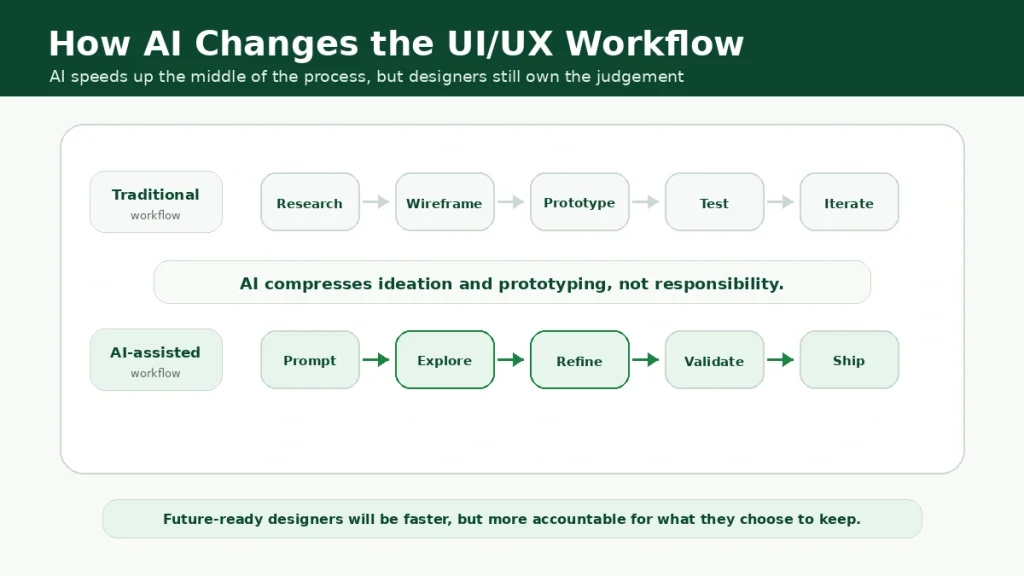
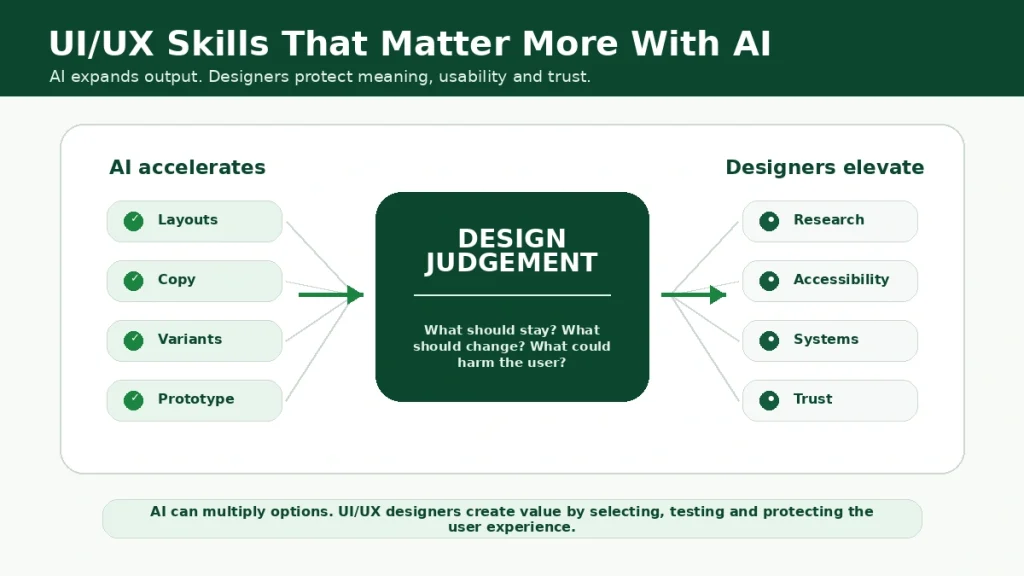
A designer can now generate layout ideas, write interface copy, create quick wireframes, test variations and build prototype directions faster than before. But speed alone does not make a product easier to use. It does not tell you whether the interface solves the right problem. It does not understand cultural context, brand trust, accessibility, emotion, ethics or the moment where a user gives up because the product feels confusing.
That is why the future of UI/UX design is not simply “AI will replace designers”. The better way to understand it is this: AI will change what designers spend time on.
Less time may be spent on blank-canvas production. More time will need to go into judgement, research, product thinking, design systems, accessibility, testing and deciding what should not be automated.
For learners and professionals who want to stay relevant, the question is no longer whether AI belongs in design. It already does. The question is how to use it without losing the human-centred thinking that makes UI/UX valuable in the first place.
The UI/UX and Graphic Design Course with GenAI from Digital Regenesys is built around this shift, combining design fundamentals with practical GenAI-supported workflows for modern digital product design.

What AI Means for UI/UX Design
AI in UI/UX design refers to the use of artificial intelligence tools to support research, ideation, wireframing, prototyping, visual design, copywriting, testing, accessibility checks, personalisation and product decision-making.
It can assist designers in many ways.
- AI can generate layout options.
- It can turn rough prompts into early interface ideas.
- It can summarise research notes.
- It can suggest UX copy.
- It can create design variations.
- It can help simulate user attention.
- It can support accessibility checks.
- It can help teams move from idea to prototype faster.
But AI does not automatically create good UX. Good UX still depends on understanding users, testing assumptions, reducing friction, designing for accessibility and making products feel useful, clear and trustworthy.
AI can accelerate the design process. It cannot replace the responsibility behind design decisions.
Trend 1: Generative UI Is Changing Early Design Exploration
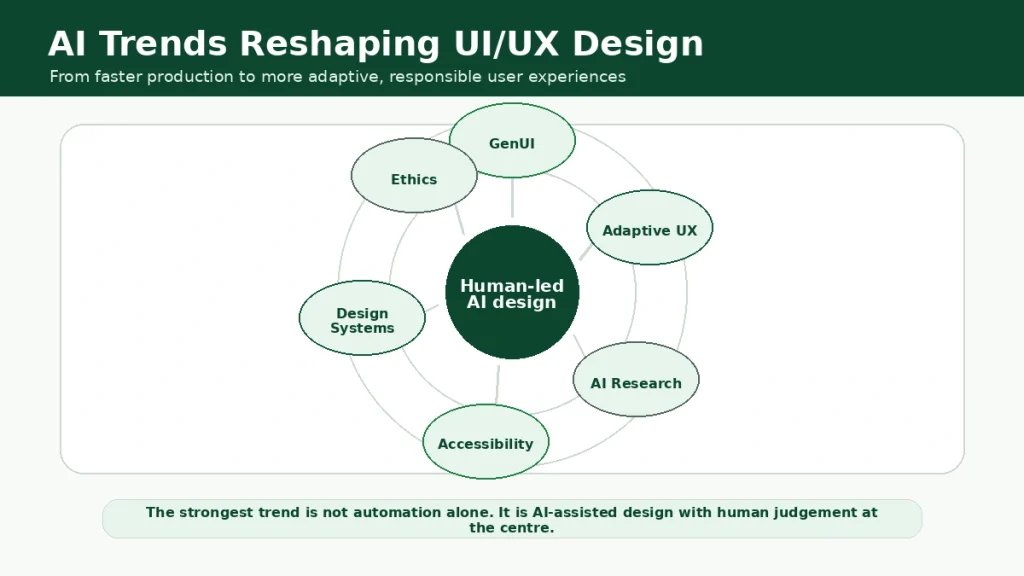
One of the biggest emerging AI trends in UI/UX design is Generative UI, often called GenUI. This is where AI tools generate interface ideas, wireframes, prototypes or screen layouts from a prompt. Instead of starting with a blank canvas, designers can begin with several possible directions and refine from there.
This can be useful because early design work often involves exploration. A designer may need to test different onboarding flows, dashboard structures, landing page layouts or mobile app screens. AI can help generate starting points quickly, giving teams more options to compare.
The risk is that teams may mistake “fast” for “right”. A generated screen can look polished but still fail the user. It may ignore accessibility. It may use generic patterns. It may not match the brand. It may solve the wrong problem.
This means designers will need to become better editors. In the AI era, the skill is not only creating the first version. The skill is knowing which version deserves to survive.
Trend 2: AI Is Moving UX Research Faster
UX research is also changing. AI can help summarise interviews, cluster themes, extract patterns from survey responses and create first-draft research notes. It can support desk research, competitor analysis and persona development.
This is useful because UX teams often work under time pressure. Product teams want quick answers. Stakeholders want evidence. Designers need insight before they build.
But research is not only about summarising data. Research requires interpretation. It requires understanding what people say, what they avoid saying, what they struggle to explain and what the context means. AI can help organise findings, but it can also flatten nuance if teams trust it too quickly.
This is especially important in South Africa and other diverse markets, where language, access, culture, affordability, digital literacy and trust can shape the user experience.
AI may help with research speed. Human researchers must still protect research quality.
Trend 3: Interfaces Are Becoming More Adaptive
Traditional interfaces are often static. Every user sees the same structure, the same options and the same flow. AI makes interfaces more adaptive. An AI-supported product can personalise recommendations, adjust content, predict user needs, simplify choices or surface relevant actions based on behaviour.
This can improve UX when done well. For example, a learning platform can suggest the next lesson based on progress. A banking app can highlight unusual spending patterns. A healthcare platform can simplify information based on user needs. An e-commerce site can improve discovery through personalised suggestions.
But personalisation can also become invasive. If users feel watched, manipulated or confused by changing interfaces, trust drops. If personalisation hides important options, users may lose control. If AI makes assumptions based on poor data, the experience can become unfair.
The future of adaptive UX will depend on transparency. Users should know when AI is shaping their experience, why certain options appear and how they can change or control the experience.
Trend 4: AI Is Changing Design Systems
Design systems help teams create consistent products. They define components, colours, typography, spacing, interaction patterns, accessibility rules and reusable design elements.
AI is making design systems more important, not less. When AI tools generate layouts and prototypes, they need design rules. Without a strong design system, AI-generated screens can become inconsistent, off-brand or difficult for developers to maintain.
This creates a new opportunity for UI/UX designers. Designers will need to build systems that AI can work with. Components may need clearer naming. Patterns may need stronger documentation. Tokens, variants and reusable layouts will become more valuable.
The designer’s job will shift from drawing every screen manually to shaping the rules that help teams and AI tools create better screens consistently. That is a more strategic design role.
Trend 5: AI Is Expanding Accessibility Work
Accessibility is one of the most important areas where AI can support UI/UX design. AI tools can help identify contrast issues, suggest alt text, check readability, support captions, simplify content and flag potential usability barriers.
This can make accessibility easier to include earlier in the process. But AI accessibility checks are not enough on their own. A tool may detect technical issues, but real accessibility also depends on lived experience, testing, context and inclusive thinking. A product may pass a basic check and still be hard to use for someone with low digital literacy, limited data, older devices or different language needs.
In South Africa, this matters. Designers need to think beyond perfect-device users. They must consider mobile-first access, load speed, data cost, language clarity, screen size, trust and support.
AI can help designers find problems faster. It should not become an excuse to stop testing with real people.
Trend 6: UX Writing and Microcopy Are Becoming AI-Assisted
Small words can change the whole experience. Button text, error messages, onboarding prompts, form labels and empty-state messages can either guide users or confuse them.
AI can help generate UX writing options quickly. Designers can ask for shorter error messages, friendlier onboarding copy or clearer form instructions.
This is useful, but the danger is generic copy. AI often produces safe, polished language that sounds fine but lacks brand personality, local context or emotional awareness.
Good UX writing still needs judgement. A payment error message must be clear and calm. A healthcare message must be sensitive. A student registration flow must reduce anxiety. A legal or financial interface must avoid vague language. AI can draft. Designers must decide.
Trend 7: AI Is Blurring the Line Between Design and Development
UI/UX design is moving closer to development. AI tools can now support prompt-to-code, generate front-end components, create prototypes and help designers understand how a design may become a working product.
This does not mean every designer must become a software developer. But it does mean designers benefit from understanding HTML, CSS, JavaScript, component logic and technical constraints.
The Digital Regenesys UI/UX and Graphic Design Course with GenAI includes UI/UX design, graphic design, front-end development and mobile app design elements, which fits this shift.
Modern designers do not need to know everything, but they do need to collaborate better with developers.
AI makes this collaboration faster, but also more demanding. Designers will need to explain logic, understand component behaviour and design screens that can actually be built.
Trend 8: Designers Are Becoming Curators, Strategists and Problem Framers
AI can produce many options. That is both useful and dangerous.
When a tool can generate ten landing page designs in minutes, the designer’s value shifts. It is no longer only about producing a layout. It is about knowing what the layout must achieve.
- What is the user trying to do?
- What information matters first?
- What should be removed?
- What emotion should the interface create?
- Where might the user hesitate?
- What does the business need?
- What should be tested before launch?
This is why UI/UX designers will need stronger product thinking. AI increases production speed. It does not automatically improve decision quality.
The designers who grow in the AI era will be those who can frame problems clearly, evaluate options wisely and defend decisions with evidence.
Turn Design Curiosity Into a Real Skill
Learn UI/UX principles and visual design, enhanced with generative AI tools.
Explore ProgrammeThe Impact of AI on UI/UX Jobs
AI will change UI/UX jobs, but not in one simple way. Some basic production tasks may become easier to automate. Designers who only create generic layouts may feel pressure. Junior designers may need stronger portfolios because AI tools can now produce beginner-level outputs quickly.
At the same time, demand for high-quality design judgement may grow. Companies still need people who understand users, simplify complex journeys, build trust, run tests, design systems, work with developers and connect design to business outcomes.
The role may become less about “make this screen look good” and more about “make this product work better”.
Possible future-facing design roles include:
- UI/UX Designer with GenAI skills
- Product Designer
- UX Researcher
- AI Product Designer
- Conversation Designer
- Design Systems Designer
- UX Writer
- Accessibility Designer
- Human-AI Interaction Designer
- UX Strategist
- Product Experience Designer
AI will not remove the need for design. It will raise the standard for what counts as good design.
Skills UI/UX Designers Need in the AI Era
The future UI/UX designer needs a wider skill set.
Core skills still matter:
- User research
- Wireframing
- Prototyping
- Visual design
- Interaction design
- Information architecture
- Usability testing
- Accessibility
- Design systems
- UX writing
AI adds new skills:
- Prompting for design work
- AI-assisted research synthesis
- AI tool evaluation
- Ethical design judgement
- Human-AI interaction
- Design-system-aware AI workflows
- Data-informed UX decisions
- AI-supported prototyping
- Bias and risk awareness
This is why a modern course must teach both design foundations and AI-enabled workflows.
The UI/UX and Graphic Design Course with GenAI from Digital Regenesys is relevant because it combines user-centred design, visual design, prototyping, wireframing, interface aesthetics and GenAI-supported design workflows.
Learners who want to strengthen problem-solving before or alongside UI/UX can also explore Design Thinking, which focuses on user-centred solutions, ideation, prototyping and innovation.
AI Tools Will Not Replace Design Thinking
Design thinking is still important because AI tools need direction.
- A prompt is not a strategy.
- A generated wireframe is not a validated solution.
- A quick prototype is not user understanding.
Design thinking helps designers stay grounded in the problem. It keeps the process focused on empathy, ideation, prototyping, testing and iteration.
AI can support this process, but it should not replace it.
The designer still needs to ask:
- Who is the user?
- What problem are we solving?
- What evidence do we have?
- What assumptions are we making?
- What should we test?
- What could go wrong?
- What would make this more inclusive?
Without those questions, AI can simply help teams build the wrong thing faster.
How to Prepare for AI-Driven UI/UX Design
Start by learning the fundamentals. AI tools change quickly. Design principles last longer.
Learn layout, hierarchy, colour, typography, accessibility, user research, usability testing, prototyping and design systems. Then learn how AI can support those skills.
Build a portfolio that shows process, not only final screens. Employers and clients want to see how you think. Show the problem, research, wireframes, decisions, iterations and final design. If AI helped, explain how you used it and what you changed.
Practise using AI responsibly. Use it for idea generation, copy variations, research summaries and prototype directions, but never accept outputs without review.
Keep testing with real people. The future belongs to designers who can use AI without losing contact with users.
Common Mistakes Designers Should Avoid
- The first mistake is using AI to skip research.
- The second mistake is accepting the first generated design because it looks polished.
- The third mistake is ignoring accessibility.
- The fourth mistake is relying on AI-generated UX copy without checking tone, clarity and context.
- The fifth mistake is letting AI flatten brand personality.
- The sixth mistake is building a portfolio full of beautiful screens without showing thinking.
- The seventh mistake is treating AI as a replacement for design judgement.
AI can help designers move faster. It cannot make weak thinking strong.

Next UI/UX Batch Starts Soon
Join 500,000+ alumni building portfolio-ready design skills with AI.
Enrol NowAI Will Reward Designers Who Think Better, Not Just Designers Who Work Faster
The impact of AI on UI/UX design is not only about speed. Speed is useful, but speed can also be dangerous when teams stop thinking deeply.
The best designers in the AI era will not be the ones who generate the most screens. They will be the ones who ask better questions, choose better directions, test more carefully and protect the user’s experience when tools make production easier.
AI will change the design workflow. It will change what clients expect. It will change what junior designers need to prove. It will change how teams move from idea to prototype. But the centre of UI/UX design should remain the same: people.
For learners who want to build practical UI/UX skills while understanding how GenAI fits into modern design, the UI/UX and Graphic Design Course with GenAI from Digital Regenesys offers a future-facing route into design work that is creative, practical and AI-aware.
Last Updated: 15 July 2026