Building the Future of UX Design in a World of Generative AI

The future of UX design is being shaped by Generative Artificial Intelligence, new expectations from users and the growing demand for faster digital product development. Designers can now use AI to generate interface ideas, summarise research, create visual variations and develop early prototypes more quickly.
However, producing screens faster does not automatically create a better user experience. Effective UX still depends on understanding people, identifying genuine problems, testing assumptions and making responsible design decisions.
This means the role of the designer is not disappearing. Instead, it is expanding. Designers must learn how to combine human-centred thinking with AI-supported tools while protecting accessibility, trust, privacy and usability.
Creative professionals who want to develop these abilities can explore the UI/UX and Graphic Design Course with GenAI from Digital Regenesys. The course combines essential design principles with practical GenAI-supported workflows, helping learners prepare for a changing digital design environment.
What Does the Future of UX Design Look Like?
The future of UX design will involve closer collaboration between human designers and intelligent digital tools. AI may support repetitive, exploratory and data-heavy tasks, while designers remain responsible for understanding users and making final decisions.
Future UX workflows may increasingly include:
- AI-generated wireframes and interface concepts
- Faster synthesis of user-research findings
- Automated creation of design variations
- Personalised interfaces based on user behaviour
- AI-assisted UX writing and microcopy
- Automated accessibility checks
- Rapid interactive prototyping
- Design systems that adapt across products and platforms
Although these tools can improve speed, designers will still need to determine whether an experience is useful, understandable, inclusive and trustworthy.
What Is Generative AI in UX Design?
Generative AI in UX design refers to the use of artificial intelligence systems that can create new design content from instructions, examples or existing information.
Depending on the tool, Generative AI may help produce:
- Interface layouts
- Wireframes
- Prototype screens
- User personas
- Research summaries
- UX copy
- Images and visual assets
- Alternative user flows
- Design-system components
These outputs should generally be treated as starting points rather than finished solutions. A generated layout may appear polished while still failing to address the user’s real problem.
How Is AI Changing UX Design?
AI is changing UX design by reducing the time required for some early design and production activities. Instead of beginning every project with an empty canvas, designers can generate initial directions and then refine the strongest options.
This can help teams explore more possibilities before committing to one design approach.
Faster idea generation
Designers can use prompts to generate several possible layouts, visual directions or interaction concepts. This can make early brainstorming more efficient.
Quicker research synthesis
AI can assist with organising interview notes, identifying repeated themes and summarising large amounts of user feedback.
However, the designer must still review the findings, understand their context and avoid treating an automated summary as unquestionable evidence.
Rapid prototyping
Some AI design tools can turn natural-language descriptions into interface structures or interactive prototypes. This can help teams test an idea before investing heavily in development.
More design variations
AI can generate different versions of a component, page or visual asset. Designers can then compare these options against the project’s user needs and brand standards.
Closer connection between design and development
AI-assisted tools can help convert interface ideas into functional interactions or front-end structures. This may reduce some of the distance between an initial design and a working prototype.
What Are the Benefits of AI in UX Design?
When used responsibly, AI can support designers throughout the product-development process.
Greater speed
AI can reduce the time spent creating initial layouts, summarising research and preparing repeated visual variations.
More room for exploration
Designers may be able to compare more ideas because early concepts can be generated quickly.
Improved efficiency
Automating repetitive activities may give designers more time for research, strategy, testing and collaboration.
Better use of research
AI can help teams organise large volumes of qualitative and quantitative information. This can make patterns easier to identify, provided the output is reviewed carefully.
Faster experimentation
Teams can create and test several possible solutions before selecting one for further development.
Support for smaller design teams
AI tools may help smaller teams complete tasks that previously required more time or specialist resources. However, the quality of the outcome will still depend on human knowledge and judgement.
Can AI Generate Complete User Interfaces?
AI-generated user interfaces are becoming more capable. Designers can describe a product, page or interaction and receive a proposed layout or functioning prototype.
For example, a designer could ask an AI tool to create:
- A mobile banking dashboard
- An ecommerce checkout flow
- A healthcare appointment screen
- A student learning portal
- A software onboarding sequence
These generated interfaces can accelerate exploration. Nevertheless, they may contain generic patterns, inconsistent logic, inaccessible elements or features that do not solve the user’s problem.
A professional designer must therefore evaluate:
- Whether the interface meets a genuine user need
- Whether the navigation is clear
- Whether the interaction flow is logical
- Whether the content is accurate
- Whether the experience is accessible
- Whether the design reflects the brand
- Whether users trust the product
Why Human-Centred Design Still Matters
Human-centred design begins with people rather than technology. It requires designers to investigate users’ needs, motivations, environments and limitations before creating a solution.
Generative AI can produce outputs based on patterns in its training data or the information it receives. However, it does not automatically understand the full emotional, cultural or social context of a real user.
Human-centred design therefore remains essential to the future of UX design.
Designers must continue to:
- Conduct user interviews
- Observe real behaviour
- Identify pain points
- Test designs with representative users
- Consider cultural and social context
- Challenge assumptions
- Advocate for user needs
AI can support this process, but it should not replace direct engagement with users.
How Can Generative AI Support UX Research?
User research helps teams understand who they are designing for and what problems need to be solved.
Generative AI may support research by helping teams:
- Prepare interview questions
- Organise research notes
- Summarise interview transcripts
- Group similar comments into themes
- Compare findings across user groups
- Create early research reports
- Identify questions for further investigation
Nevertheless, research findings should not be accepted simply because an AI system produced a clear summary. Designers need to check whether important context, minority viewpoints or contradictory evidence has been excluded.
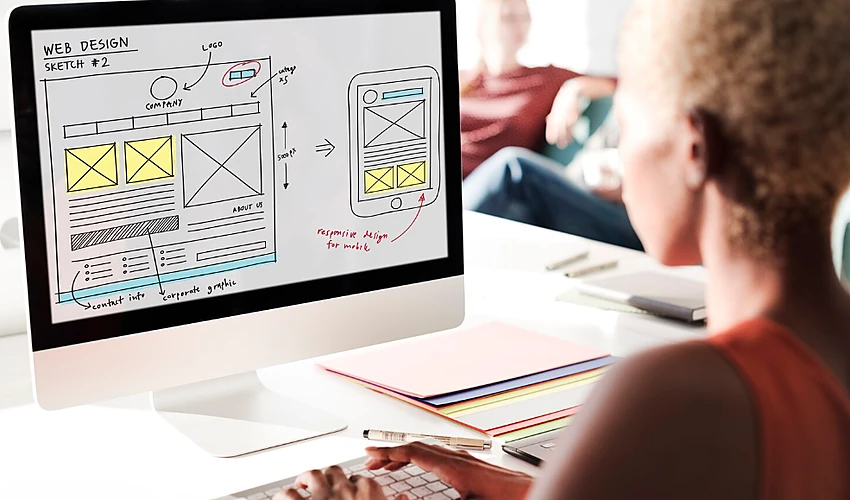
How AI Is Changing Wireframing and Prototyping
Wireframes help designers plan the structure and function of an interface before focusing on detailed visual styling.
Traditionally, designers created these screens manually. Today, AI prototyping tools can generate early structures from written instructions.
A designer may describe:
- The intended user
- The purpose of the screen
- The required content
- The main user action
- The desired navigation
- The platform or device
The tool may then produce an initial layout. The designer can review it, correct problems and generate further versions.
This process can make prototyping faster, but the first output should not be treated as the final answer. Good UX requires iteration, testing and refinement.
Personalisation in UX Using AI
AI can help digital products adjust content, recommendations and interface behaviour according to user information or previous activity.
Examples of personalisation include:
- Recommended products
- Suggested learning content
- Personalised dashboards
- Adaptive navigation
- Relevant notifications
- Location-based information
- Content presented according to previous behaviour
Personalisation can make an experience feel more relevant. However, designers must avoid creating experiences that are intrusive, confusing or dependent on information users did not knowingly agree to share.
Clear consent, privacy controls and understandable explanations should be built into personalised experiences.
Generative AI in Graphic Design
Generative AI is also changing graphic design by helping creatives generate concepts, visual assets and alternative compositions.
Graphic designers may use AI to support:
- Mood-board development
- Image generation
- Background creation
- Concept exploration
- Layout variations
- Colour experimentation
- Social-media graphics
- Presentation design
- Brand-asset exploration
However, successful graphic design still requires knowledge of typography, hierarchy, layout, colour, composition and visual communication.
AI may produce an image quickly, but the designer must determine whether it communicates the right message and supports the intended audience.
What Are the Challenges of Generative AI in UX?
Generative AI creates new opportunities, but it also introduces risks that designers must understand.
Generic design outputs
AI may reproduce common interface patterns without considering the specific needs of a project.
Bias
Generated content may reflect biases found in training data or supplied information. This can affect personas, images, recommendations and automated decisions.
Privacy concerns
Designers should avoid uploading confidential customer information, unpublished product details or sensitive research data into tools without approved safeguards.
Inaccurate information
AI-generated copy, personas and research summaries may include errors or unsupported assumptions.
Loss of originality
Overreliance on generated outputs can lead to visually similar and predictable experiences.
Weak design reasoning
A polished output can hide poor thinking. Designers may be tempted to accept an attractive screen without examining whether it solves the right problem.
Unclear ownership
Organisations may need policies covering intellectual property, licensing, attribution and the use of generated visual assets.
Ethical Use of AI in UX Design
Ethical design means considering how a product may influence users and whether that influence is fair, transparent and respectful.
When using AI, designers should consider:
- What information the system collects
- How personal data will be used
- Whether users have meaningful control
- Whether automated decisions can be explained
- Whether some groups may be disadvantaged
- Whether the interface encourages harmful behaviour
- Whether users can challenge or correct an automated outcome
Designers should also avoid using AI to create manipulative experiences that pressure people into choices they would not otherwise make.
Why Accessibility Must Remain a Priority
Accessible design helps people with disabilities use digital products, services and information more effectively.
AI can support accessibility checks, but designers remain responsible for applying inclusive principles throughout the experience.
Important considerations include:
- Sufficient colour contrast
- Clear and consistent navigation
- Visible interaction states
- Meaningful labels
- Keyboard accessibility
- Alternative text for important images
- Designs that work across different screen sizes
- Clear feedback when an action succeeds or fails
Accessibility should not be treated as an automated check completed at the end of a project. It should influence research, content, interface design and testing from the beginning.
Will AI Replace UX Designers?
AI is more likely to change the work of UX designers than remove the need for them completely.
Some production activities may become faster or more automated. At the same time, organisations will still need professionals who can:
- Understand users
- Frame the correct problem
- Interpret research
- Make ethical decisions
- Evaluate generated outputs
- Facilitate collaboration
- Test designs
- Balance user and business needs
- Protect accessibility and trust
The designer’s value will increasingly come from judgement rather than the ability to produce one screen manually.
The Role of UX Designers in the Age of AI
The designer of the future may act as a researcher, strategist, curator, facilitator and quality controller.
Rather than creating every element from the beginning, designers may guide tools, compare outputs and decide which direction should move forward.
This role may involve:
- Writing clearer design prompts
- Defining rules for AI-generated interfaces
- Checking outputs for bias and accessibility
- Combining AI ideas with user-research evidence
- Maintaining design-system consistency
- Explaining design decisions to stakeholders
- Testing whether generated solutions work for real users
Therefore, AI fluency should strengthen design ability rather than replace design fundamentals.
What Skills Will UX Designers Need in the AI Era?
The future of UX design requires a combination of established design skills and new AI capabilities.
Core UX skills
- User research
- Information architecture
- Wireframing
- Interaction design
- Usability testing
- Visual design
- Accessibility
- UX writing
- Design systems
AI-supported design skills
- Writing effective prompts
- Evaluating AI-generated interfaces
- AI-assisted research synthesis
- Generating and refining prototypes
- Understanding human-AI interaction
- Recognising bias and risk
- Protecting confidential information
- Using AI without weakening design judgement
Designers who combine both skill sets will be better prepared to work in teams where AI is part of the normal creative process.
How to Become an AI-Fluent Designer
An AI-fluent designer understands how to use intelligent tools while remaining grounded in design principles and user needs.
Learn the foundations first
Develop a strong understanding of visual design, user research, wireframing, prototyping and usability before relying heavily on automation.
Experiment with AI design tools
Use different tools to generate layouts, images, copy and prototypes. Compare their strengths and weaknesses.
Practise writing clear prompts
Strong prompts should explain the user, objective, required content, platform, constraints and desired interaction.
Review every output critically
Do not accept a generated design simply because it looks professional. Ask whether it is useful, accessible and supported by evidence.
Build practical projects
Create portfolio work that shows both the final design and the thinking behind it. Employers need to understand how you identified the problem and validated the solution.
Stay informed about ethics
Learn about privacy, bias, copyright, transparency and responsible AI use.
Why Study UI/UX and Graphic Design With GenAI?
A modern design course should teach more than how to operate software. It should help learners understand users, communicate visually and develop solutions that work across platforms.
The UI/UX and Graphic Design Course with GenAI from Digital Regenesys combines graphic design, UI/UX design, front-end development, mobile-app design and GenAI-supported workflows.
Learners explore areas such as:
- User-centred design principles
- User behaviour
- Wireframing and prototyping
- Typography and colour
- Interface design
- Visual communication
- Mobile-app design
- GenAI-supported creativity
- Practical design projects
- Portfolio development
The course is suitable for aspiring designers, creative learners, professionals and people interested in combining technology with visual problem-solving.
Turn Design Curiosity Into a Real Skill
Learn UI/UX principles and visual design, enhanced with generative AI tools.
Explore ProgrammeCareer Opportunities in UI/UX and Graphic Design
The skills developed through UI/UX, graphic design and AI-supported learning may contribute to roles such as:
- UI designer
- UX designer
- Graphic designer
- Visual designer
- Product designer
- UX researcher
- Interaction designer
- Digital designer
- Mobile-app designer
- AI UI/UX designer
The exact opportunities available will depend on the learner’s portfolio, practical ability, experience and understanding of the relevant tools.
Next UI/UX Batch Starts Soon
Join 500,000+ alumni building portfolio-ready design skills with AI.
Enrol NowConclusion
The future of UX design will not be defined by AI alone. It will be shaped by how designers use AI to understand problems, explore possibilities and create better digital experiences.
Generative AI can accelerate research synthesis, wireframing, visual exploration and prototyping. However, it cannot remove the need for empathy, testing, accessibility and responsible judgement.
The strongest designers will not simply be those who generate screens quickly. They will be the ones who recognise the right problem, evaluate outputs carefully and protect the interests of the user.
Explore the Digital Regenesys UI/UX and Graphic Design Course with GenAI and build practical design skills for an AI-supported creative future.
Last Updated: 20 July 2026