Generative AI for UI UX Design: Tools, Skills and Career Benefits

Generative AI for UI UX design is changing how designers research users, explore ideas, create interfaces and test digital experiences. Instead of beginning every project with a blank screen, designers can now use AI to generate concepts, organise information and develop early design options more efficiently.
However, creating a successful digital product still requires more than entering a prompt. Designers must understand people, identify the right problem, structure information clearly and make informed decisions about usability, accessibility and visual communication.
This is why modern UI/UX professionals need both traditional design skills and the ability to use AI responsibly. A structured UI UX design course with AI can help learners combine these capabilities while building practical experience.
Those considering this career can also explore how to become a UX designer in South Africa and the skills needed to enter the field.
This guide explains how generative AI fits into UI and UX design, which tasks it can support, what designers still need to learn and how these capabilities can strengthen career opportunities.
What is generative AI for UI UX design?
Generative AI for UI UX design refers to the use of artificial intelligence to produce or transform design-related content. Depending on the tool and task, AI may generate written ideas, interface layouts, images, wireframes, research summaries or early prototypes.
In UI design, AI can help create visual options for screens, components, colour combinations and layouts. In UX design, it can assist with research organisation, persona drafts, user journeys, content structures and testing preparation.
These capabilities can make parts of the design process faster. Nevertheless, AI-generated output should be treated as a starting point rather than a finished solution.
A designer still needs to decide whether an idea is relevant, usable, inclusive and aligned with the needs of the user and organisation.
What is the difference between UI and UX design?
UI and UX design are closely connected, but they do not mean the same thing.
User Experience design, commonly called UX design, focuses on how a person interacts with a product or service. It examines whether the experience is useful, logical, accessible and easy to navigate.
UX designers may work on:
- User research
- User personas
- Customer journey maps
- Information architecture
- User flows
- Wireframes
- Prototypes
- Usability testing
User Interface design, or UI design, focuses more closely on the visual and interactive elements of a digital product.
UI designers may work on:
- Page and screen layouts
- Typography
- Colour systems
- Buttons and navigation
- Icons and visual assets
- Spacing and hierarchy
- Responsive design
- Design systems
A product can look attractive but still be difficult to use. It can also function well while appearing visually inconsistent. Therefore, strong digital products require both UI and UX thinking.
How is AI used for UI UX design?
AI can support several stages of the design process, from early research to prototype development. Its role will depend on the project, the quality of available information and the judgement of the designer.
Common applications include:
- Summarising user research
- Generating interview questions
- Drafting user personas
- Exploring customer journeys
- Creating UX copy and microcopy
- Generating wireframe concepts
- Producing interface variations
- Creating placeholder images and graphics
- Developing early prototypes
- Organising usability feedback
For example, a designer may use AI to generate several homepage structures based on a defined audience and business objective. The designer can then evaluate which structure communicates the most important information clearly.
As a result, AI can reduce the time spent producing initial options. It does not, however, remove the need to understand the problem those options are meant to solve.
How to use AI in UX design
Generative AI in UX design can support research, planning and early problem-solving. Used carefully, it can help designers process information and explore possibilities more efficiently.
1. Support user research preparation
Before interviewing users, designers can use AI to draft questions around a particular product, audience or problem.
The resulting questions should still be reviewed. Leading questions, assumptions and irrelevant wording can affect the quality of the research.
2. Organise research findings
UX research can produce large volumes of notes and feedback. AI may help group responses into themes, identify repeated concerns and summarise common patterns.
However, the designer must check that important context has not been removed. A summary may appear clear while overlooking meaningful differences between users.
3. Create early persona drafts
AI can help organise verified user information into a structured persona containing goals, frustrations and behaviours.
Designers should avoid inventing personas based only on assumptions. A convincing AI-generated profile is not a substitute for genuine user evidence.
4. Explore user journeys
A designer can use AI to identify possible stages a user may move through when completing a task, such as applying for a course, purchasing a product or booking an appointment.
The journey must then be compared with actual user behaviour and organisational processes.
5. Develop UX copy
AI can generate first drafts of headings, button labels, instructions, error messages and onboarding content.
Clear UX copy helps users understand what to do next. Therefore, every suggestion should be checked for clarity, accuracy, tone and accessibility.
6. Analyse usability feedback
After a prototype has been tested, AI can help organise feedback and identify repeated difficulties.
Even so, the design team must decide which issues are most serious and how they should be addressed.
How generative AI supports UI design
Generative AI in UI design is often used to speed up visual exploration. Designers can produce several concepts quickly and compare different approaches before refining the strongest direction.
AI may assist with:
- Layout exploration
- Colour palette suggestions
- Typography combinations
- Image and icon generation
- Interface component ideas
- Design-system documentation
- Responsive layout variations
- Graphic asset creation
Although this can improve speed, good UI design still depends on visual hierarchy, consistency and usability.
A screen should help users recognise what matters, understand available actions and move through the experience confidently. Producing more options does not guarantee that any of them will achieve those goals.
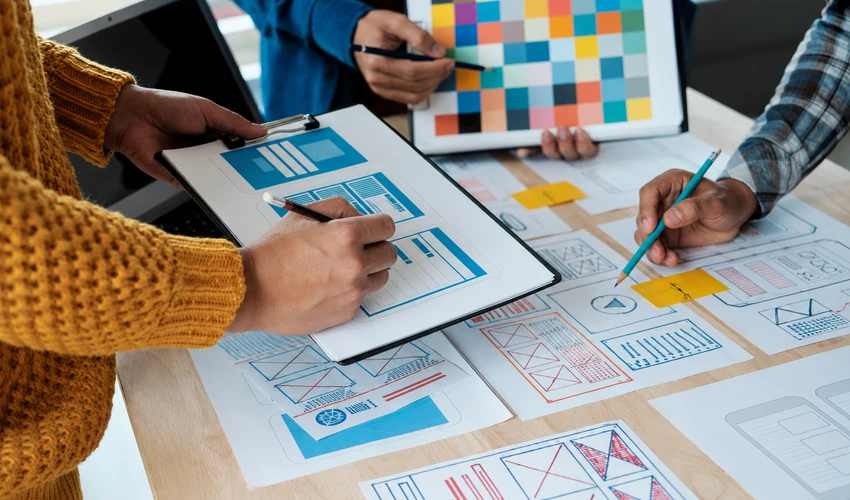
Using AI tools for wireframing
A wireframe is a basic representation of a screen or page. It focuses on structure, content placement and functionality before detailed visual styling is added.
AI tools for wireframing can transform a written description into an early page structure. For instance, a designer may request a course landing page containing a hero section, programme benefits, curriculum overview, testimonials and an application form.
The generated wireframe can accelerate early exploration. The designer must still examine:
- Whether the information is arranged logically
- Whether the main action is easy to find
- Whether unnecessary content should be removed
- Whether the structure suits the target audience
- Whether the design will work across different devices
Wireframing is not simply about placing boxes on a screen. It requires decisions about what users need, what the organisation wants them to do and how the experience should guide them.
How AI prototyping tools support design
A prototype allows designers and stakeholders to experience how a digital product may work before it is fully developed.
AI prototyping tools can help connect screens, suggest interactions and transform initial descriptions into interactive concepts. This can allow teams to test an idea sooner and identify usability problems before investing heavily in development.
For example, a designer may create a prototype of a mobile application and test whether users can register, find a service and complete a booking.
Feedback from this process can reveal confusing navigation, missing information or unnecessary steps.
AI can support prototype creation, but the value comes from what the designer learns through testing and iteration.
How is generative AI used in graphic design?
Graphic design communicates ideas through typography, imagery, colour, composition and visual hierarchy. GenAI can assist graphic designers by generating concepts, visual elements and alternative versions of creative work.
Possible applications include:
- Developing mood-board ideas
- Generating image concepts
- Exploring campaign directions
- Creating background elements
- Producing layout variations
- Adapting designs for different formats
- Removing or replacing image elements
- Drafting supporting copy
Nevertheless, designers remain responsible for ensuring that a creative concept communicates the correct message and follows the brand identity.
They must also consider image quality, originality, copyright, representation and the possibility of misleading AI-generated content.
What are the benefits of AI-powered UI UX design?
AI-powered UI UX design can provide several advantages when it is integrated into a structured and human-centred workflow.
Faster idea generation
Designers can explore several possible directions without manually producing each option from the beginning.
More time for strategic thinking
Automating repetitive tasks can allow designers to spend more time on user needs, product goals, accessibility and testing.
Quicker early prototypes
Teams can develop and evaluate concepts before committing significant time and resources to development.
Support for content creation
AI can help draft UX copy, interface instructions, placeholder content and creative concepts.
Greater experimentation
Designers can compare alternative structures, styles and content approaches more efficiently.
Improved workflow efficiency
AI may reduce the time required for routine production, organisation and documentation tasks.
These benefits depend on thoughtful use. Moving faster is valuable only when the design team is moving in the right direction.
What are the limitations of generative AI in design?
Generative AI can produce convincing outputs, but it does not understand users in the same way that a human designer can.
Important limitations include:
- Inaccurate or fabricated information
- Biased or stereotypical outputs
- Generic design suggestions
- Inconsistent interface elements
- Limited understanding of cultural context
- Potential privacy concerns
- Copyright and ownership questions
- Weak accessibility decisions
- Overreliance on existing design patterns
AI may generate an attractive interface that does not meet the actual needs of the user. It may also create content that appears accurate but contains errors.
Therefore, designers need to evaluate, edit and test AI-assisted work before it is used in a real product.
Will AI replace UI UX designers?
AI is more likely to change the responsibilities of UI/UX designers than remove the need for them entirely.
Some routine production tasks may become faster or more automated. At the same time, designers will need to contribute more through research, judgement, strategy and decision-making.
AI cannot independently determine:
- Which user problem deserves attention
- Whether research findings are trustworthy
- How cultural differences affect an experience
- Whether an interface creates confidence or confusion
- Which business objective should be prioritised
- Whether a design is ethical and inclusive
- What should be tested before launch
The ability to generate a screen is only one part of design. The greater challenge is deciding what should be created, why it should exist and whether it works for the intended audience.
Designers who combine human-centred thinking with effective AI use may therefore become more valuable, not less.
What skills do UI UX designers need in the AI era?
Learning an AI tool is useful, but tools will continue to change. Designers need broader capabilities that remain valuable even as technology evolves.
Important skills include:
- User research
- Problem definition
- Information architecture
- Wireframing
- Prototyping
- Usability testing
- Visual design
- Typography and colour theory
- Accessibility
- Responsive design
- Design-system thinking
- Prompt development
- AI-output evaluation
- Communication and collaboration
Basic knowledge of HTML, CSS and JavaScript can also help designers understand how digital interfaces are built and communicate more effectively with developers.
The strongest designers will not rely on AI to make every decision. Instead, they will know when to use it, how to assess its output and when a human-led approach is more appropriate.
Can beginners learn UI UX design with AI?
Beginners can learn UI/UX design with AI, provided that they do not skip the fundamental principles of design.
Starting with AI alone may create the impression that design is mainly about producing attractive screens. In reality, learners need to understand users, structure information and test whether a product is easy to use.
A beginner-friendly learning path should include:
- Graphic design fundamentals
- UI and UX principles
- User-centred design
- Research and problem definition
- Wireframing and prototyping
- Visual-design tools
- Website and mobile design
- Basic front-end concepts
- GenAI-assisted workflows
- Practical portfolio projects
This approach helps learners understand both the creative and strategic sides of design.
Turn Design Curiosity Into a Real Skill
Learn UI/UX principles and visual design, enhanced with generative AI tools.
Explore ProgrammeWhat careers can UI UX and graphic design skills support?
UI/UX and graphic design capabilities can support opportunities across agencies, technology companies, financial services, education, retail, healthcare and other digital-first industries.
Potential roles may include:
- UI Designer
- UX Designer
- UI/UX Designer
- Graphic Designer
- Digital Designer
- Web Designer
- Mobile App Designer
- Visual Designer
- Interaction Designer
- Junior Product Designer
- Design Assistant
- Creative Content Designer
A course does not automatically guarantee employment. However, structured learning can help candidates build relevant skills, complete practical projects and create work they can present to potential employers or clients.
Why is a design portfolio important?
Employers and clients often want to see how a designer thinks, not only which tools the person has used.
A strong portfolio should explain:
- The problem that needed to be solved
- The intended user or audience
- The research or evidence considered
- The design process followed
- The decisions made
- The prototype or final design
- The feedback received
- How the work was improved
AI-assisted designs can be included, but candidates should explain how AI was used and which decisions they made themselves.
A portfolio filled with attractive screens but no clear reasoning may not demonstrate genuine UX ability.
How to choose a UI UX design course with AI
Before enrolling, compare more than the course title. A strong programme should teach design fundamentals as well as modern AI-supported methods.
Consider whether the course includes:
- Graphic design and UI/UX principles
- Practical design tools
- User-centred design
- Wireframing and prototyping
- Website and mobile app design
- Basic front-end development
- GenAI design applications
- Real projects and assignments
- Portfolio development
- Academic or learning support
- A certificate of completion
A course should not teach learners to depend on one AI platform. Instead, it should help them understand the design process so they can adapt as tools change.
Study UI UX and Graphic Design with GenAI at Digital Regenesys
The Digital Regenesys UI/UX and Graphic Design with GenAI course combines foundational design principles with practical digital and AI-supported skills.
The six-month online programme covers areas such as:
- Graphic design and UI/UX fundamentals
- Canva, Figma and Adobe design tools
- Typography, colour and visual layout
- User-centred design
- Wireframing and prototyping
- HTML, CSS and JavaScript fundamentals
- WordPress, Webflow and Wix
- Mobile app design
- GenAI-supported design automation
- Practical portfolio projects
It is designed for learners who want to build practical capabilities for modern digital-design environments. Through structured learning and project-based application, participants can develop work that demonstrates both creative ability and design thinking.
Next UI/UX Batch Starts Soon
Join 500,000+ alumni building portfolio-ready design skills with AI.
Enrol NowFinal thoughts
Generative AI for UI UX design can help designers research, explore, create and test ideas more efficiently. It can support wireframing, prototyping, interface design, content generation and graphic-design workflows.
However, technology does not replace the need to understand people. Successful digital products still depend on research, empathy, communication, accessibility and informed decision-making.
The future belongs to designers who can combine creativity with critical thinking. Those who understand design fundamentals and learn to use GenAI responsibly will be better prepared to adapt as digital tools and workplace expectations evolve.
For beginners and professionals who want structured training, an online UI UX and graphic design course with GenAI can provide a practical route towards developing these skills and building a stronger portfolio.
Last Updated: 22 July 2026